Mostrando las entradas con la etiqueta Pygame. Mostrar todas las entradas

jueves, 22 de noviembre de 2018

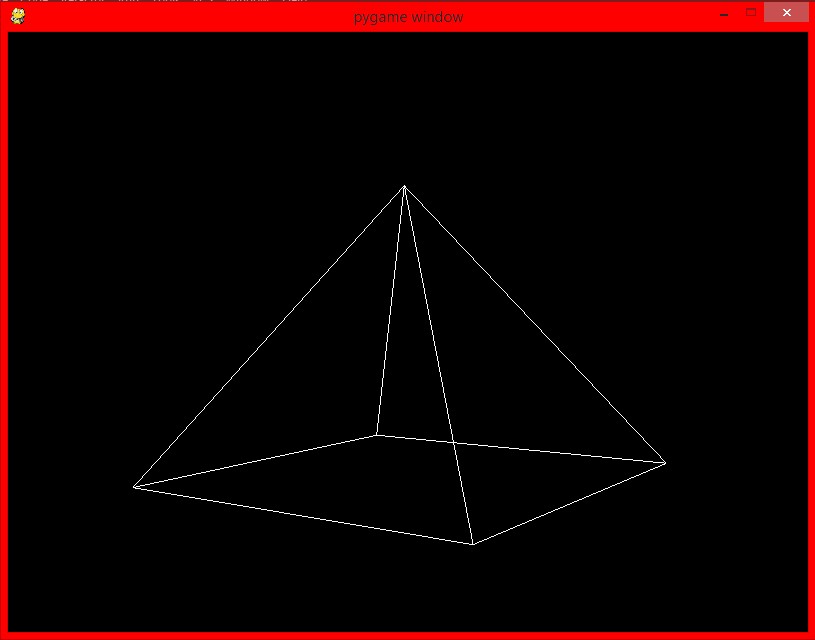
Triangulo y Cubo 3D

Sintaxis del programa TRIANGULO:


import pygame
from pygame.locals import *


from OpenGL.GL import *
from OpenGL.GLU import *

verticies = (
    (1, -1, -1),
    (1, 1, -1),
    (-1, 1, -1),
    (-1, -1, -1),
    (0,0,1)

    )

edges = (
    (4,0),
    (4,1),
    (4,2),
    (4,3),
    (0,1),
    (0,3),
    (2,1),
    (2,3)

    )


def Cube():
    glBegin(GL_LINES)
    for edge in edges:
        for vertex in edge:
            glVertex3fv(verticies[vertex])
    glEnd()


def main():
    pygame.init()
    display = (800,600)
    pygame.display.set_mode(display, DOUBLEBUF|OPENGL)

    gluPerspective(45, (display[0]/display[1]), 0.1, 50.0)

    glTranslatef(0.0,0.0, -5)

    while True:
        for event in pygame.event.get():
            if event.type == pygame.QUIT:
                pygame.quit()
                quit()

        glRotatef(1, 3, 1, 1)
        glClear(GL_COLOR_BUFFER_BIT|GL_DEPTH_BUFFER_BIT)
        Cube()
        pygame.display.flip()
        pygame.time.wait(10)


main()

Corrida en pantalla:


Sintaxis del programa CUBO:


import pygame
from pygame.locals import *

from OpenGL.GL import *
from OpenGL.GLU import *

verticies = (
    (1, -1, -1),
    (1, 1, -1),
    (-1, 1, -1),
    (-1, -1, -1),
    (1, -1, 1),
    (1, 1, 1),
    (-1, -1, 1),
    (-1, 1, 1)
    )

edges = (
    (0,1),
    (0,3),
    (0,4),
    (2,1),
    (2,3),
    (2,7),
    (6,3),
    (6,4),
    (6,7),
    (5,1),
    (5,4),
    (5,7)
    )


def Cube():
    glBegin(GL_LINES)
    for edge in edges:
        for vertex in edge:
            glVertex3fv(verticies[vertex])
    glEnd()


def main():
    pygame.init()
    display = (800,600)
    pygame.display.set_mode(display, DOUBLEBUF|OPENGL)

    gluPerspective(45, (display[0]/display[1]), 0.1, 50.0)

    glTranslatef(0.0,0.0, -5)

    while True:
        for event in pygame.event.get():
            if event.type == pygame.QUIT:
                pygame.quit()
                quit()

        glRotatef(1, 3, 1, 1)
        glClear(GL_COLOR_BUFFER_BIT|GL_DEPTH_BUFFER_BIT)
        Cube()
        pygame.display.flip()
        pygame.time.wait(10)


main()

Corrida en pantalla


Cubo animado en 3D

Sintaxis del programa:

import sys, math, pygame
from operator import itemgetter
class Point3D:
    def __init__(self, x=0, y=0, z=0):
        self.x, self.y, self.z = float(x), float(y), float(z)
    def rotateX(self, angle):
        """ Rotates the point around the X axis by the given angle in degrees. """
        rad = angle * math.pi / 180
        cosa = math.cos(rad)
        sina = math.sin(rad)
        y = self.y * cosa - self.z * sina
        z = self.y * sina + self.z * cosa
        return Point3D(self.x, y, z)
    def rotateY(self, angle):
        """ Rotates the point around the Y axis by the given angle in degrees. """
        rad = angle * math.pi / 180
        cosa = math.cos(rad)
        sina = math.sin(rad)
        z = self.z * cosa - self.x * sina
        x = self.z * sina + self.x * cosa
        return Point3D(x, self.y, z)

    def rotateZ(self, angle):
        """ Rotates the point around the Z axis by the given angle in degrees. """
        rad = angle * math.pi / 180
        cosa = math.cos(rad)
        sina = math.sin(rad)
        x = self.x * cosa - self.y * sina
        y = self.x * sina + self.y * cosa
        return Point3D(x, y, self.z)

    def project(self, win_width, win_height, fov, viewer_distance):
        """ Transforms this 3D point to 2D using a perspective projection. """
        factor = fov / (viewer_distance + self.z)
        x = self.x * factor + win_width / 2
        y = -self.y * factor + win_height / 2
        return Point3D(x, y, self.z)


class Simulation:
    def __init__(self, win_width=640, win_height=480):
        pygame.init()

        self.screen = pygame.display.set_mode((win_width, win_height))
        pygame.display.set_caption("Figura de cubo 3D en python")

        self.clock = pygame.time.Clock()

        self.vertices = [
            Point3D(-1, 1, -1),
            Point3D(1, 1, -1),
            Point3D(1, -1, -1),
            Point3D(-1, -1, -1),
            Point3D(-1, 1, 1),
            Point3D(1, 1, 1),
            Point3D(1, -1, 1),
            Point3D(-1, -1, 1)
        ]

        # Define the vertices that compose each of the 6 faces. These numbers are
        #  indices to the vertices list defined above.
        self.faces = [(0, 1, 2, 3), (1, 5, 6, 2), (5, 4, 7, 6), (4, 0, 3, 7), (0, 4, 5, 1), (3, 2, 6, 7)]

        # Define colors for each face
        self.colors = [(255, 0, 100), (100, 0, 0), (0, 25, 0), (0, 0, 255), (0, 255, 155), (255,5, 0)]

        self.angle = 0
    def run(self):
        """ Main Loop """
        while 1:
            for event in pygame.event.get():
                if event.type == pygame.QUIT:
                    pygame.quit()
                    sys.exit()

            self.clock.tick(50)
            self.screen.fill((0, 32, 0))

            # It will hold transformed vertices.            \
            t = []

            for v in self.vertices:
                # Rotate the point around X axis, then around Y axis, and finally around Z axis.
                r = v.rotateX(self.angle).rotateY(self.angle).rotateZ(self.angle)
                # Transform the point from 3D to 2D
                p = r.project(self.screen.get_width(), self.screen.get_height(), 256, 4)
                # Put the point in the list of transformed vertices
                t.append(p)

            # Calculate the average Z values of each face.
            avg_z = []
            i = 0
            for f in self.faces:
                z = (t[f[0]].z + t[f[1]].z + t[f[2]].z + t[f[3]].z) / 4.0
                avg_z.append([i, z])
                i = i + 1
            # Draw the faces using the Painter's algorithm:
            #  Distant faces are drawn before the closer ones.
            for tmp in sorted(avg_z, key=itemgetter(1), reverse=True):
                face_index = tmp[0]
                f = self.faces[face_index]
                pointlist = [(t[f[0]].x, t[f[0]].y), (t[f[1]].x, t[f[1]].y),
                             (t[f[1]].x, t[f[1]].y), (t[f[2]].x, t[f[2]].y),
                             (t[f[2]].x, t[f[2]].y), (t[f[3]].x, t[f[3]].y),
                             (t[f[3]].x, t[f[3]].y), (t[f[0]].x, t[f[0]].y)]
                pygame.draw.polygon(self.screen, self.colors[face_index], pointlist)

            self.angle += 1
            pygame.display.flip()


if __name__ == "__main__":
    Simulation().run()


Corrida en pantalla del programa:


viernes, 9 de noviembre de 2018

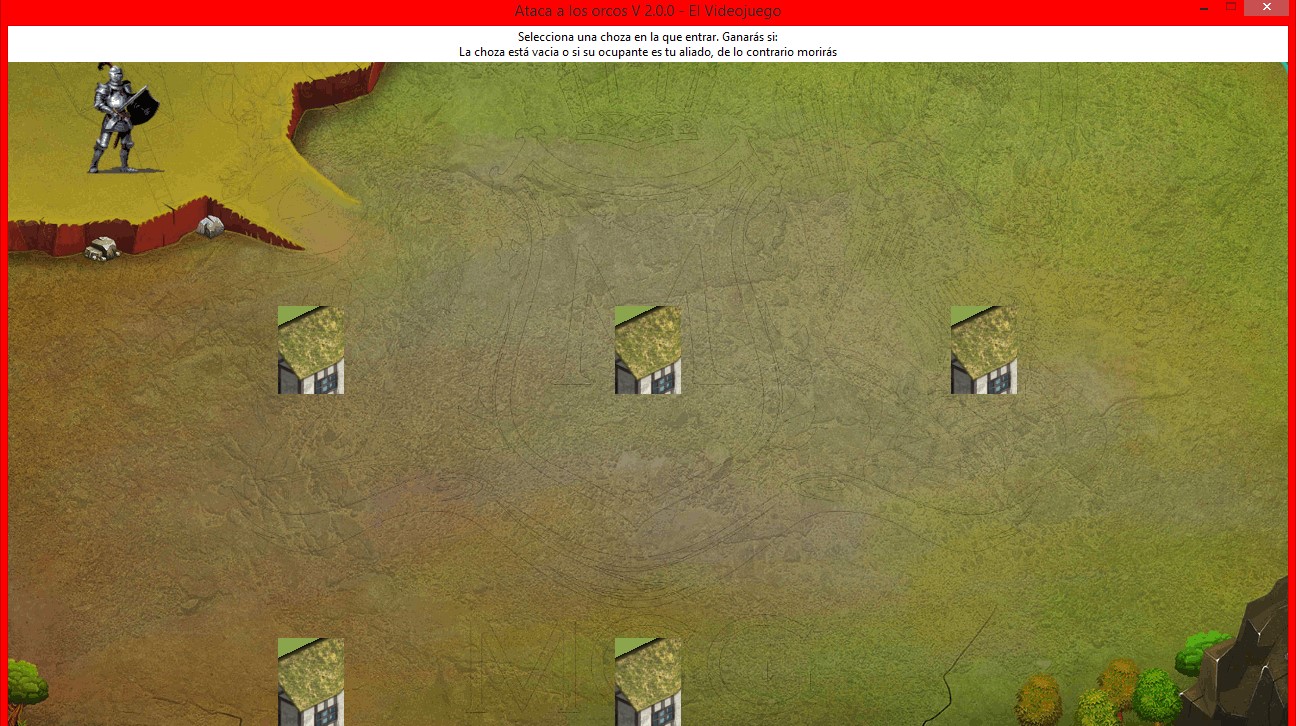
Juego de las chozas grafico. (Practica No.21)

Sintaxis del programa:


# -*- coding: utf-8 -*-

import sys
import random

from PIL import Image,ImageTk


if sys.version_info < (3, 0):
    from Tkinter import Tk, Label, Radiobutton, PhotoImage, IntVar
    import tkMessageBox as messagebox
else:
    from tkinter import Tk, Label, Radiobutton, PhotoImage, IntVar
    from tkinter import messagebox


class JuegoChozas:
    def __init__(self, parent):
        self.imagen_fondo = PhotoImage(file="Jungle_small_2.gif")
        self.imagen_choza = PhotoImage(file="Hut_small_2.gif")

        self.ancho_choza = 40
        self.alto_choza = 80
        self.container = parent

        self.Chozas = []
        self.result = ""

        self.ocupar_chozas()

        self.setup()

    def ocupar_chozas(self):
        ocupantes = ['enemigo', 'amigo', 'vacia']
        while len(self.Chozas) < 5:
            computer_choice = random.choice(ocupantes)
            self.Chozas.append(computer_choice)
        print("Los ocupantes de las chozas son:", self.Chozas)

    def entrar_choza(self, numero_choza):
        print("Entrando en la choza #:", numero_choza)
        ocupante_choza = self.Chozas[numero_choza-1]
        print("El ocupante de la choza es: ", ocupante_choza)

        if ocupante_choza == 'enemigo':
            self.result = "Enemigo visto en la choza # %d \n\n" % numero_choza
            self.result += "Has perdido :( Mucha suerte la próxima vez!"
        elif ocupante_choza == 'vacia':
            self.result = "La Choza # %d está vacia\n\n" % numero_choza
            self.result += "Enhorabuena! Has ganado!!!"
        else:
            self.result = "Amigo visto en la choza # %d \n\n" % numero_choza
            self.result += "Enhorabuena! Has ganado!!!"

        self.anunciar_ganador(self.result)

    def crear_widgets(self):

        self.var = IntVar()
        self.background_label = Label(self.container,
                                      image=self.imagen_fondo)
        txt = "Selecciona una choza en la que entrar. Ganarás si:\n"
        txt += "La choza está vacia o si su ocupante es tu aliado, de lo contrario morirás"
        self.info_label = Label(self.container, text=txt, bg='white')
        # Creamos un dicionario con las opciones para las imagenes de las chozas
        r_btn_config = {'variable': self.var,
                        'bg': '#8AA54C',
                        'activebackground': 'green',
                        'image': self.imagen_choza,
                        'height': self.alto_choza,
                        'width': self.ancho_choza,
                        'command': self.radio_btn_pressed}

        self.r1 = Radiobutton(self.container, r_btn_config, value=1)
        self.r2 = Radiobutton(self.container, r_btn_config, value=2)
        self.r3 = Radiobutton(self.container, r_btn_config, value=3)
        self.r4 = Radiobutton(self.container, r_btn_config, value=4)
        self.r5 = Radiobutton(self.container, r_btn_config, value=5)

    def setup(self):
        self.crear_widgets()
        self.setup_layout()

    def setup_layout(self):
        self.container.grid_rowconfigure(1, weight=1)
        self.container.grid_columnconfigure(0, weight=1)
        self.container.grid_columnconfigure(4, weight=1)
        self.background_label.place(x=0, y=0, relwidth=1, relheight=1)
        self.info_label.grid(row=0, column=0, columnspan=5, sticky='nsew')
        self.r1.grid(row=1, column=0)
        self.r2.grid(row=1, column=2)
        self.r3.grid(row=1, column=4)
        self.r4.grid(row=4, column=2)
        self.r5.grid(row=4, column=0)

    def anunciar_ganador(self, data):
        messagebox.showinfo("¡Atención!", message=data)

    # Handle Events
    def radio_btn_pressed(self):
        self.entrar_choza(self.var.get())

if __name__ == "__main__":

    mainwin = Tk()
    WIDTH = 1280
    HEIGHT = 700
    mainwin.geometry("%sx%s" % (WIDTH, HEIGHT))
    mainwin.resizable(0, 0)
    mainwin.title("Ataca a los orcos V 2.0.0 - El Videojuego")
    game_app = JuegoChozas(mainwin)
    mainwin.mainloop()


Corrida en pantalla del programa


Creditos al canal de Piensa 3D: https://www.youtube.com/watch?v=xbDa2bVmjSk

miércoles, 7 de noviembre de 2018

Juego de piedra,papel o tijeras en interfaz grafica. Aporte por Carlos Olvera Magno (Practica No. 19)

Sintaxis del programa:


from Tkinter import *  # libreria para utilizar las ventanas,labels,ventanasemergentes y botones
from tkMessageBox import *  # para poder utilizar el abra el cuadro de dialogo
import random  # para poder generar nuneros aleatorios


def funcion(opcion):
    tiposdemanos = ['piedra', 'papel', 'tijera']  # creo un arreglo con tres valores posibles
    eleccion_aleatoria = random.choice(
        tiposdemanos)  # a la variable le asigno un valor a traves de random utilizando uno de los tres valores que estan en el array
    decisioncpu = eleccion_aleatoria  # la variable decision cpu se iguala
    decision_usuario = opcion  # utilizo como parametro la variable opcion y la igualo a decision usuario para poder usarla en el if

    if decision_usuario == 1:  # el numero uno lo uso como tijera y ese valor se lo asigno al presionar el boton 'piedra'
        Decisionusuario = Label(ventana, text='elegiste piedra', font=("agency fb", 12)).place(x=50, y=220)
        imagen1 = PhotoImage(file='piedrausuario.gif')  # utilizo una imagen para mostrar mi seleccion
        lblusuario = Label(ventana, image=imagen1).place(x=50, y=300)  # muestro esa image a traves de un label
        DecisionCPU = Label(ventana, text=('la cpu eligio ' + decisioncpu), font=("agency fb", 12)).place(x=300,
                                                                                                          y=220)  # muestro en pantalla la decision random que genero
        if decisioncpu == "piedra":  # la decision random la comparo con cadenas de caracteres en los 3 casos
            imagen2 = PhotoImage(file='piedracpu.gif')  # eligo la imagen determinada
            lblcpu = Label(ventana, image=imagen2).place(x=250, y=300)  # y la muestro en pantalla
            showinfo(title='resultado',
                     message='empate')  # atravez de una ventana emergente muestro si gano,perdio o empato

        elif decisioncpu == 'papel':
            imagen2 = PhotoImage(file='papelcpu.gif')
            lblcpu = Label(ventana, image=imagen2).place(x=250, y=300)
            showinfo(title='resultado ', message='perdiste')

        else:
            imagen2 = PhotoImage(file='tijeracpu.gif')
            lblcpu = Label(ventana, image=imagen2).place(x=250, y=300)
            showinfo(title='resultado', message='Ganaste')


    elif decision_usuario == 2:
        imagen1 = PhotoImage(file='papelusuario.gif')
        lblusuario = Label(ventana, image=imagen1).place(x=50, y=300)
        Label10 = Label(ventana, text='elegiste papel', font=("agency fb", 12)).place(x=50, y=220)
        Label11 = Label(ventana, text=('la cpu eligio ' + decisioncpu), font=("agency fb", 12)).place(x=300, y=220)
        if decisioncpu == 'piedra':
            imagen2 = PhotoImage(file='piedracpu.gif')
            lblcpu = Label(ventana, image=imagen2).place(x=250, y=300)
            print 'haz ganado pax'
            showinfo(title='resultado ', message='Ganaste')
        elif decisioncpu == 'papel':
            imagen2 = PhotoImage(file='papelcpu.gif')
            lblcpu = Label(ventana, image=imagen2).place(x=250, y=300)
            print 'empate'
            showinfo(title='resultado', message='empate')

        else:
            imagen2 = PhotoImage(file='tijeracpu.gif')
            lblcpu = Label(ventana, image=imagen2).place(x=250, y=300)
            print 'haz perdido!!!!'
            showinfo(title='resultado ', message='perdiste')

    elif decision_usuario == 3:
        imagen1 = PhotoImage(file='tijerausuario.gif')
        lblusuario = Label(ventana, image=imagen1).place(x=50, y=300)
        Label10 = Label(ventana, text='elegiste tijera', font=("agency fb", 12)).place(x=50, y=220)
        Label11 = Label(ventana, text=('la cpu eligio ' + decisioncpu), font=("agency fb", 12)).place(x=300, y=220)
        if decisioncpu == 'piedra':
            imagen2 = PhotoImage(file='piedracpu.gif')
            lblcpu = Label(ventana, image=imagen2).place(x=250, y=300)
            showinfo(title='resultado ', message='perdiste')
        elif decisioncpu == 'papel':
            imagen2 = PhotoImage(file='papelcpu.gif')
            lblcpu = Label(ventana, image=imagen2).place(x=250, y=300)
            showinfo(title='resultado ', message='ganaste')
        else:
            imagen2 = PhotoImage(file='tijeracpu.gif')
            lblcpu = Label(ventana, image=imagen2).place(x=250, y=300)
            showinfo(title='resultado ', message='empate')


ventana = Tk()
ventana.geometry("500x500")
ventana.title('JUEGO DEL PIEDRA PAPEL O TIJERA')

label1 = Label(text="ELIGA UNO DE LOS 3", font=("agency fb", 18)).place(x=180, y=30)

label3 = Label(ventana, text='PIEDRA,PAPEL O TIJERA:').place(x=120, y=0)
label2 = Label(ventana, text='un juego clasico y sencillo').place(x=250, y=0)
# boton para piedra
Piedra = Button(ventana, text='piedra', command=lambda: funcion(1)).place(x=150, y=100)
# boton para papel
Papel = Button(ventana, text='papel', command=lambda: funcion(2)).place(x=250, y=100)
# boton para tijera
Tijera1 = Button(ventana, text='tijera', command=lambda: funcion(3)).place(x=350, y=100)

ventana.mainloop()


Corrida en pantalla del programa:


martes, 6 de noviembre de 2018

Juego de numero al azar en interfaz grafica. Aporte por Ivan Gutierrez (Practica No. 18)

Sintaxis del programa:

Modificacion 07/11/2018
Se agrego la funcion de limpiar con un boton para que al inicar el juego de nuevo al presionar play, los mensajes no se esten quedando donde originalmente salian antes.


from Tkinter import *
import time
import random
from tkMessageBox import *
import pygame

intento=object
nombre=object
num=object
vidas_disponibles=object
aux=0

def play():
    global nombre,num,vidas_disponibles

    mensaje_usuario.set(nombre.get()+" estoy pensando en un numero entre 1 y 5 " + "crees poder adivinarlo?")
    numeros=[1,2,3,4,5]
    num=random.choice(numeros)
    print num
    vidas_disponibles=random.choice(numeros)
    time.sleep(5)
    vidas_mensaje.set("La suerte dice que tienes: "+str(vidas_disponibles)+" oportunidades")


def Respuesta_usuario():
    global vidas_disponibles,num
    vidas_disponibles-=1

    if int(intento.get())<num:
        showinfo("Muy bajo","Tu estimacion es muy baja")
        vidas_mensaje.set("Te quedan: " + str(vidas_disponibles) + " oportunidades")

    elif int(intento.get())>num:
        showinfo("Muy alto","Tu estimacion es muy alta")
        vidas_mensaje.set("Te quedan: " + str(vidas_disponibles) + " oportunidades")

    if vidas_disponibles==0 or int(intento.get())==num:
        if num == int(intento.get()):
            time.sleep(5)
            showinfo("FELICIDADES!!", "Has ganado el juego")
        elif num != int(intento.get()):
            time.sleep(5)
            showinfo("Mala suerte", "Has perdido :(")


def limpiar():
    mensaje_usuario.set("")
    vidas_mensaje.set("")


juego=Tk()
juego.title("Adivina el numero")
juego.geometry("600x600")
titulo = Label(juego,text="Bienvenido",font=("PhrasticMedium", 30)).place(x=220,y=20)
nombre=StringVar()
usuario=Entry(juego,textvariable=nombre).place(x=195,y=100)
usuario_etiqueta=Label(juego,text="Ingresa tu nombre.").place(x=70,y=100)
mensaje_usuario=StringVar()
vidas_mensaje=StringVar()
vidas= Label(juego,textvariable=vidas_mensaje).place(x=125,y=220)

mensaje2 = Label(juego, text="Intenta adivinar...").place(x=150, y=280)
intento = StringVar()
respuesta_usuario = Entry(juego, textvariable=intento).place(x=260, y=280)

mensaje=Label(juego,textvariable=mensaje_usuario).place(x=125,y=160)
BotonPlay=Button(juego,text="Play",font=("PhrasticMedium", 14),fg="green",command=play).place(x=380,y=90)
BotonComprobar=Button(juego,text="Comprobar respuesta",font=("Arial",14),fg="red",command=Respuesta_usuario).place(x=210,y=350)
BotonReinicio=Button(juego,text="Limpiar",font=("Arial",11),command=limpiar).place(x=260,y=400)

pygame.init()


juego.mainloop()

Corrida en pantalla del programa:


domingo, 4 de noviembre de 2018

Depliegue de imagenes y sonido con hilos (Practica No. 13)

Sintaxis del programa:

from Tkinter import *  # crea la GUI
from PIL import Image, ImageTk
import pygame  # ayuda a reproducir audios mp3

import os  # permite manipular archivos
import random
import time
import threading

dir = os.path.dirname(__file__)  # lo utiliza para agregar una ruta
fotos = dir + "/imagenes/"  # guarda la direccion de la carpeta mas la carpeta donde esten
sonidos = dir + "/imagenes/"  # lo mismo en esta con los audios

play= 0
foto = object
sonido = object


def Mostrar_imagenes():
    global play,fotos,foto,etiqueta,nombre
    play=1
    while play==1:
        array = [1, 2, 3, 4, 5, 6, 7, 8, 9, 10, 11]  # crea un arreglo con el nombre de las imagenes
        animales = ["Squirel", "Kitty", "Raccoon", "Panda", "Cat", "Slot", "Husky", "Labrador", "Dolphin", "Pug", "Poodle"]

        imagen_seleccionada = random.choice(array)
        selectimagen = str(array.index(imagen_seleccionada) + 1)  # elige una imagen aleatoria
        selectnombre = animales[imagen_seleccionada - 1]
        figura = fotos + selectimagen + ".png"  # guardar la foto seleccionada

        "Como despliego la imagen en la ventana Tk"
        img = Image.open(figura)  # abre la imagen seleccionada
        img.thumbnail((300, 300), Image.ANTIALIAS)  # le da un tamano igual a todas las imagenes
        foto = ImageTk.PhotoImage(img)  # convierte la imagen a un archivo que tkinter pueda mostrar
        etiqueta= Label(root,image=foto).place(x=120, y=130)
        nombre = Label(root,text=selectnombre, font=("Harlow Solid Italic", 30), fg="purple").place(x=180, y=60)
        # para reproducir sonido
        sonido = sonidos + selectimagen + ".mp3"  # guarda el audio con el numero de foto que se selecciono
        print sonido
        pygame.mixer.init()  # inicia el reproductor
        pygame.mixer.music.load(sonido)  # carga el archivo de audio
        pygame.mixer.music.play()  # comienza a reproducir el audio
        time.sleep(3)

def detener():
    global play
    play=0

def Iniciar():
    hilo1=threading.Thread(target=Mostrar_imagenes)
    hilo1.start()


root = Tk()
root.geometry("500x500")
Titulo= Label(root,text="Imagenes mostradas al azar",font=("PhrasticMedium", 20)).place(x=100, y=10)

iniciar=StringVar()
iniciar.set("Iniciar")
Boton_Iniciar= Button(root,textvariable=iniciar,font=("Martina", 14),fg="green",command=Iniciar).place(x=90,y=450)
Detener=StringVar()
Detener.set("Detener")
Boton_parar=Button(root,textvariable=Detener,font=("Martina", 14),fg="red",command=detener).place(x=410,y=450)
pygame.init()
root.mainloop()


Corrida en pantalla de la interfaz